Feed filters are not creation settings
The Android NSFW sliders only control which posts you see when browsing feeds. They do not change what MonAI can generate or what the Android app allows.
- Lower numbers hide more feed posts with higher content scores.
- Higher numbers can show more feed posts, within the feed’s built-in limits.
- These sliders do not filter your own gallery, change your prompt or model, or turn a blocked creation into a viewable image.
Find the feed controls
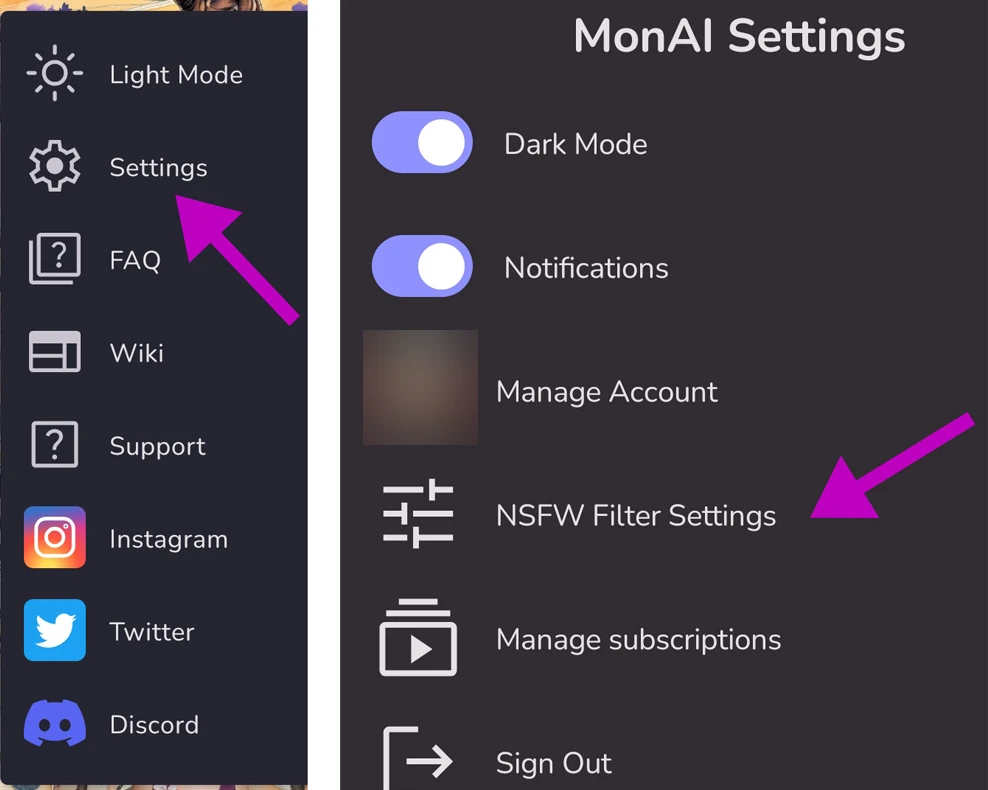
Open the three-dot menu → Settings → NSFW Filter Settings, change the sliders and tap Save.
The slider controls
The text categories use the post’s prompt scores; the image categories use its image scores.
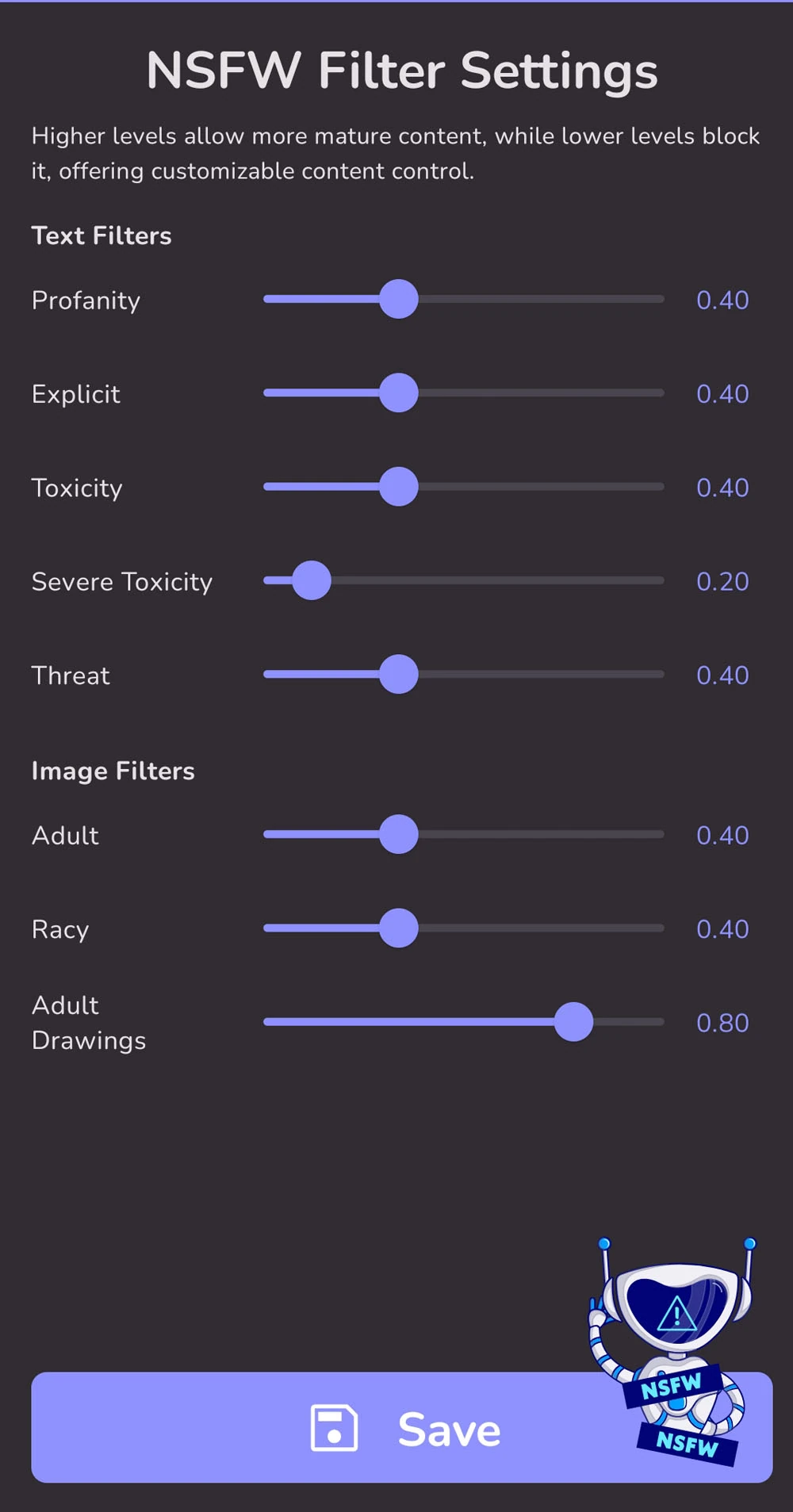
Other age and Home-feed limits still apply, so increasing one slider is not a promise that every post will appear.
Why Android blocks NSFW creation
NSFW content is blocked completely in the Android app because of Google Play policy. Changing the feed sliders does not enable NSFW generation there, even with Premium.
For the full MonAI experience, use app.monai.art. Google Play’s Android content policy does not apply to the web app. MonAI’s own content and safety rules still apply.
Visits started from MonAI’s Android apps, including web pages those apps open, use stricter content checks. This applies to that visit and the tabs it opens, not to your account or your whole browser. For the ordinary web experience, open your browser yourself, use its own New tab button and type https://app.monai.art/, rather than following a link from one of our Android apps. Sign in with the same MonAI account to keep its gallery and any remaining Premium. MonAI’s own safety rules still apply, and not every creation will be allowed.
Keep your images and Premium on the web
Sign in with the same MonAI account you use in Android, using the same Google login or email sign-in method. Your existing gallery is on that account, and your remaining Premium time applies on the web. You do not need a second subscription just to switch platforms.
Do not create a new account and expect it to contain another account’s images. If you used Android only as a guest, send a support email from that Android installation before signing out or clearing its data so Support can identify the correct account.
See MonAI on the web for the sign-in steps, gallery and Premium details, and home-screen installation instructions.
An already-withheld result is a block notice, not a blurred image: changing feed settings or opening that old result on the web will not reveal it.
¶ Questions
¶ Do the NSFW sliders change what MonAI can create?
No. The Android NSFW sliders only control which posts you see when browsing feeds. They do not change what MonAI can generate or what the Android app allows.
¶ Why does the Android app block NSFW content?
NSFW content is blocked completely in the Android app because of Google Play policy. Changing the feed sliders does not enable NSFW generation there, even with Premium.
¶ Does Google Play’s policy apply to the web app?
No. Google Play’s Android content policy does not apply to the web app at app.monai.art, but MonAI’s own content and safety rules still apply. Visits started from MonAI’s Android apps use stricter content checks; for the ordinary web experience, open a new browser tab yourself and type https://app.monai.art/.
¶ Will I keep my images and Premium on the web?
Yes, if you sign in with the same MonAI account you use in Android, using the same Google login or email sign-in method. Your gallery is on that account, and your remaining Premium time applies on the web.
¶ Can I see an image that was already withheld?
No. An already-withheld result is a block notice, not a blurred image: changing feed settings or opening that old result on the web will not reveal it.
¶ NSFW Content on the MonAI Home Page
The MonAI Home Page has an NSFW filter to omit sexual and explicit content. When using the default settings, you should not see NSFW content in the Home Page.
The filter makes mistakes and sometimes NSFW content slips through. If you are viewing the Home Page with the default settings and you see NSFW content, please report it.
Tap the 3 dots menu, and then Report post. This will log the mismarked post in our systems so others won't see it in the home feed.
Thanks for helping to keep our Home Feed safe!

¶ Examples
For example, let's take a look at the ratings for this artwork. Ratings can be found by tapping on the ( i ) at the lower right of the image.

This image has a 0.81 in Adult Drawings. I shared it to the Home Page, but I couldn't see it in the Home Page. So I increased the Adult Drawings slider. After that, the artwork appeared in my Home Page. It would also appear in the Home Page of anyone else whose NSFW Filter Settings were set accordingly.
*Please note, the Identity Attack and Flirtation ratings are not used.
Let's look at a few more artworks to get an idea of what these image ratings mean.

You might think that the image above isn't “Adult” at all, but any artwork that includes a human should get higher image ratings than one with no human, like the artwork below.

Adult Drawings is a category that should identify NSFW anime and cartoon images. Some things that don't seem adult at all still register in the Adult Drawings category.

This image rates high in the Racy category. Even though it was not designed to be erotic, the garment is rather revealing.


These are just a few examples of images and their ratings to give you some familiarity with the system.
If you customize the Home Feed to allow more artworks with higher NSFW ratings, you will see more artworks than you were able to see before. Some of these artworks may be offensive to you. If you would prefer to avoid these potentially offensive images, please return your NSFW Filter Settings to the defaults shown above.
Source: the MonAI wiki · Updated · First published