
Illustrious XL and the models built on it, such as WAI-illustrious and Nova Anime, are prompted with short Danbooru tags rather than sentences. This guide covers the tags that matter most: quality tags, artist tags, character tags, composition and rating tags, and a negative prompt. Every example comes from a MonAI wiki page, with the exact settings used.
One artist tag sets the style.
From this guide’s examples
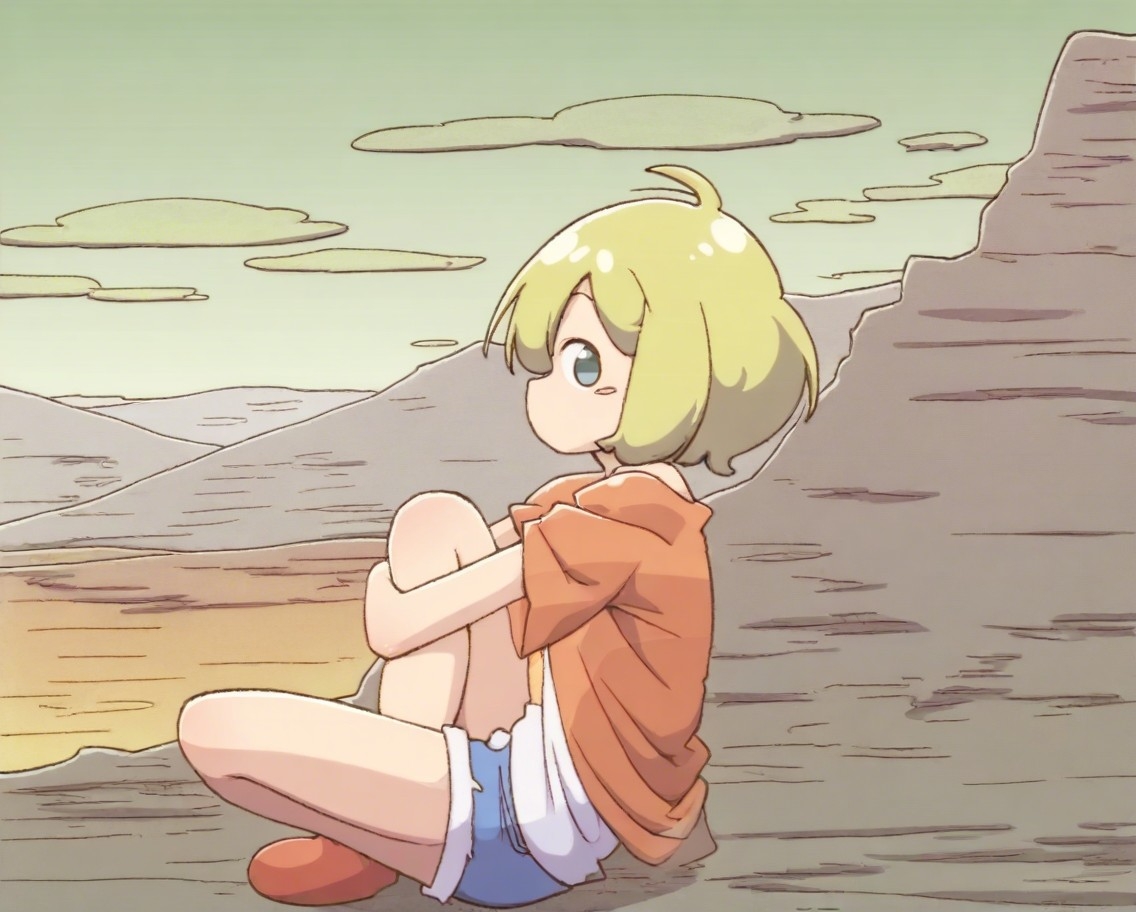
“1girl, solo, blonde hair, short hair, tshirt, denim shorts, in the desert, sitting, hugging own legs, scenic background, masterpiece, best quality, (kurororo_rororo:1.3)”
- Model
- Illustrious XL v01
- Size
- 1136 × 912
- Steps
- 30
- Guidance
- 6.8
- Seed
- Random
- Style
- None — the look is in the prompt
Opens MonAI with this prompt, model, size and steps selected. Nothing is generated until you choose.
Tags in order, quality last.
From this guide’s examples
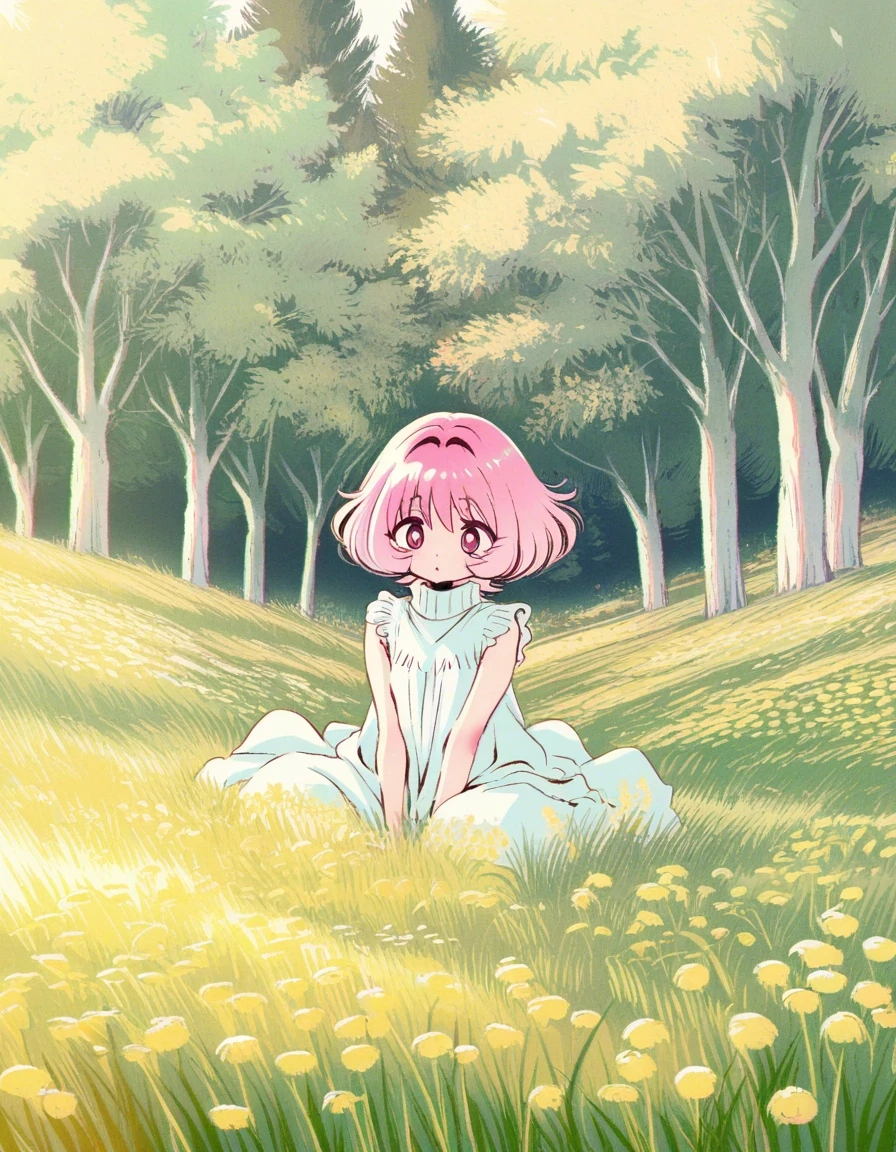
“1girl, pale pink hair, short hair, wavy hair, sleeveless blouse, mock turtleneck blouse, sitting on a grassy hill, surrounded by tall wildflowers, trees, close portrait, scenic background, masterpiece, best quality, amazing quality, very aesthetic, (akiyama_enma:1.2)”
- Model
- WAI-illustrious SDXL v15.0
- Size
- 896 × 1152
- Steps
- 25
- Guidance
- 7
- Seed
- Random
- Style
- None — the look is in the prompt
Opens MonAI with this prompt, model, size and steps selected. Nothing is generated until you choose.
¶ Illustrious prompt template
Write comma-separated tags in roughly this order:
1girl, solo, [character tag], [hair, eyes, clothes], [pose], [place, lighting], [framing], masterpiece, best quality, very aesthetic, ([artist tag]:1.2)
- Who: a count tag such as 1girl, 1boy or 2girls, often with solo. Animals work the same way: one MonAI example starts with 1kitten.
- Character (optional): the character's Danbooru tag, if you want a known character.
- Looks, one tag per detail: "pale pink hair, short hair, wavy hair" rather than one long phrase.
- Clothes, pose and place: "tshirt, denim shorts, in the desert, sitting, hugging own legs".
- Framing: upper body, cowboy shot, portrait or full body.
- Quality tags, then an optional artist tag for the style.
New to Danbooru tags? Start with Anime Prompting, which explains what they are and links to Danbooru's tag lists.
¶ Illustrious quality tags
The Illustrious XL release page lists these quality tags, from worst to best: worst quality, bad quality, average quality, good quality, best quality and masterpiece. Put the good ones in the prompt and the bad ones in the negative prompt.
| Model | Quality tags used in MonAI's examples |
|---|---|
| Illustrious XL | masterpiece, best quality, very aesthetic |
| WAI-illustrious v15 and v17 | masterpiece, best quality, amazing quality, very aesthetic |
| Nova Anime | masterpiece, best quality, amazing quality, very aesthetic, high resolution, ultra-detailed, absurdres, newest |
"absurdres" is Danbooru's tag for a very large image. It is explained in What does absurdres mean? "newest" is a date tag: Nova's suggested negative prompt lists the older ones (recent, old, oldest) to avoid older art styles.
¶ Illustrious artist tags
An artist tag is the quickest way to change the look of an Illustrious image. Most of MonAI's Illustrious examples end with one.
- Use the artist's Danbooru tag, with underscores in place of spaces: (kurororo_rororo:1.3), (akiyama_enma:1.2), (mochizuki_kei:1.2).
- Weight it up to 1.2 or 1.3 so the style shows. See Prompt Weighting.
- Escape parentheses in the name with a backslash, as in (0 \(znanimo\):1.2). Without the backslashes, the parentheses would be read as weighting.
- Mix two or three artists for a blended style, as in (by mzet:1.2), by sincos, (by jiao_chang:1.2).
Where to find artist tags to try:
- NovelAI Anime Artist Tags: a large visual gallery of Danbooru artist tags.
- Animagine v3.1 Artist References and the MonAI Artist Study. They were made with Animagine; the Illustrious XL page notes that artist styles are more well-defined in Illustrious.
- The Illustrious XL and WAI-illustrious pages: every example shows the artist tag it used next to the result.
¶ Illustrious character tags
Illustrious models know many anime and game characters by their Danbooru character tag. Use Anime Character Preview to search a list of more than 5,000 characters from the WAI-illustrious dataset, see a reference portrait where one is available, and copy the exact tag.
- Character tags often include the series in parentheses, written with backslashes in a prompt:
2b \(nier automata\). - Put the character tag near the start, then add the clothes, pose and place you want.
- If the model mixes up a detail, add the character's hair or eye colour as extra tags.
¶ Composition and rating tags
The Illustrious XL release page suggests framing tags such as upper body, cowboy shot, portrait or full body. It warns against piling up strong composition tags such as close-up, upside-down and cowboy shot together, because they can conflict.
WAI-illustrious uses four rating tags: general, sensitive, nsfw and explicit. Add nsfw to the negative prompt to steer away from mature content.
¶ Illustrious negative prompt
A short negative prompt is enough for WAI-illustrious. The example images on its Civit page use:
bad quality, worst quality, worst detail
Many Illustrious XL examples on this wiki use a longer one, such as:
lowres, (low quality, worst quality:1.3), bad anatomy, displeasing, ugly, fewer digit, extra digit, missing fingers, bad hands, blurry
Add watermark and signature if text appears in your images, and nsfw if you want to steer away from mature content.
¶ Recommended settings
| Setting | Illustrious XL | WAI-illustrious |
|---|---|---|
| Guidance Scale | 5 to 7.5 (release page). MonAI starts at 5. | 5 to 7 (Civit). MonAI starts at 7. |
| Steps | 20 to 28 (release page). MonAI starts at 25. | 25 to 40 (Civit). MonAI starts at 25. |
| Size | 896x1152 for portraits, 1024x1024 for squares, 1136x912 for landscapes. MonAI accepts 512 to 1536 pixels on each side. | |
¶ Which Illustrious model should you use?
There is no single best one. They all take the same kind of prompt, so the quickest way to choose is to run one prompt on each.
- Illustrious XL v0.1: the base model. A distinctive look and strong artist styles.
- WAI-illustrious v15 and v17: a very popular anime model based on Illustrious XL.
- Nova Anime: based on Illustrious XL, with good prompt adherence and anatomy. MonAI has several versions.
- CyberRealistic CyberIllustrious: a realistic model based on Illustrious XL. Prompt it with plain words (woman, man) rather than Danbooru tags.
¶ Use Illustrious online
MonAI runs Illustrious XL, WAI-illustrious and Nova Anime in your browser at app.monai.art, on a phone, tablet or computer. There is nothing to download or install. The two featured examples open MonAI with their model, prompt and settings filled in. Nothing is generated until you choose.
¶ Example prompts
Each example lists the exact prompt, negative prompt and settings used to make it.
|
Model: Illustrious XL Prompt: 1girl, solo, blonde hair, short hair, tshirt, denim shorts, in the desert, sitting, hugging own legs, scenic background, masterpiece, best quality, (kurororo_rororo:1.3) Negative Prompt: lowres, (low quality, worst quality:1.3), bad anatomy, displeasing, ugly, fewer digit, extra digit, missing fingers, bad hands, blurry Guidance Scale: 6.8 |
|
Model: WAI-illustrious-SDXL v15.0 Prompt: 1girl, pale pink hair, short hair, wavy hair, sleeveless blouse, mock turtleneck blouse, sitting on a grassy hill, surrounded by tall wildflowers, trees, close portrait, scenic background, masterpiece, best quality, amazing quality, very aesthetic, (akiyama_enma:1.2) Negative Prompt: (bad quality, worst quality), lowres, bad anatomy, (bad hands), watermark, signature, worst detail Guidance Scale: 7.0 |
For dozens more examples, see Illustrious XL, WAI-illustrious v15 and Anime Prompting Examples.
Source: the MonAI wiki · Updated · First published